From Monolith to Dockerized Microservices
Modernizing legacy applications often begins with a single, crucial step: containerization. Moving from a monolithic application deployed via configuration management scripts directly onto VMs, to a Dockerized architecture is a significant paradigm shift. This post covers practical strategies for this transition, focusing on multi-stage builds and the importance of internal container registries.
The Lift and Shift (And Why It's Just the Beginning)
The initial temptation is to write a massive Dockerfile that installs all the OS dependencies, pulls the code, builds the assets, and runs the application, effectively treating the container like a lightweight VM. While this "lift and shift" gets you running on Docker quickly, it results in bloated images that are slow to pull, consume excess storage, and present a massive attack surface.
Mastering Multi-Stage Builds
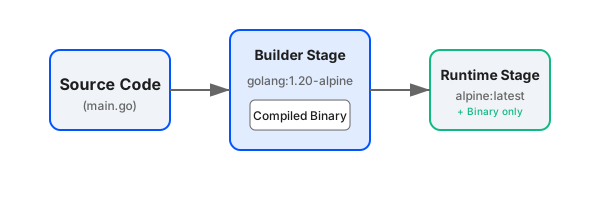
The solution to bloated images is the multi-stage build. Introduced in Docker 17.05, this feature allows you to use multiple FROM statements in your Dockerfile. You can use a heavy, tool-laden image for compiling your application, and then copy only the compiled artifacts into a tiny, secure runtime image.
Consider a Go application. You need the Go toolchain to compile it, but the resulting binary is entirely self-contained.
# Stage 1: Build
FROM golang:1.20-alpine AS builder
WORKDIR /app
COPY . .
RUN go build -o myapp main.go

# Stage 2: Runtime
FROM alpine:latest
WORKDIR /root/
# Copy the binary from the builder stage
COPY --from=builder /app/myapp .
# Run as non-root user for security
RUN adduser -D myuser
USER myuser
CMD ["./myapp"]
This approach drastically reduces the final image size—often from hundreds of megabytes down to just 10-20MB. Smaller images mean faster deployments, reduced bandwidth costs, and fewer vulnerabilities to patch.
Securing the Supply Chain: Internal Registries
Once you are building optimized images, you need a place to store them. Relying entirely on public registries like Docker Hub for proprietary code is a security risk and can lead to rate-limiting issues during automated deployments.
Setting up an internal container registry is paramount. Solutions like Harbor, AWS ECR, or Google Artifact Registry provide not just storage, but essential security features:
- Vulnerability Scanning: Automatically scan images for known CVEs before they are allowed into production.
- Role-Based Access Control (RBAC): Restrict who can push to or pull from specific repositories.
- Image Signing: Ensure that the image you deploy is the exact image produced by your CI pipeline, preventing tampering.
The Path Forward
Containerizing a monolith is rarely a "done in a day" project. It requires auditing dependencies, untangling local file system usage (moving to S3/Object storage), and rethinking logging (moving to stdout/stderr). However, by enforcing best practices like multi-stage builds early on and establishing a secure registry infrastructure, you lay the groundwork for a robust, scalable microservices architecture.